
Summarization experiments with Hugging Face Transformers - part 2
Generate summaries using the Pipeline API from the Transformers library by chunking the input text.

🧩 The problem
In this post we’ll continue from where we left off last time. Our objective is to generate summaries locally using the Transformers Python library and compatible AI models. We saw that, despite the official tutorials say using Transformers is easy via the Pipeline API, it turns out it’s not that simple to get a working output. We’ll now see what happens with different inputs and parameters, as well as a simple way to fix some issues.
Just like with text generation (the one that you commonly use with GPT-like web UIs) the inference quality depends from the model.
📏 Fixing the token lengths
We can now attempt to fix the pipeline1 options for summarization by setting a custom max_length value. Let’s try that immediately2:

max_length value to 30If you read the output at line 4, it’s obvious that it’s truncated3:

We need more adjustments4:

min_length argument as wellNow we finally have full sentences5:

🖹 Real text file
We can try a bigger input and see what happens. I have an SRT (subtitle file) of one of my YouTube videos. I cleaned it up by removing timestamps. Just for reference, the wc -w command counts 1959 words.
File reading is done via the pathlib module methods6:

Once I pass the text to the pipeline object I get these errors7:

Apparently these small summarization models have severe limitations in input size. A possible simple solution, without involving fine tuning or researching more capable models, is to perform some chunking of the input text.
✅ Solution
Ok, so we know this specific model, facebook/bart-large-cnn, can’t handle long texts, but by chunking the input file we can create several summaries standalone and then join them as a single string. For simplicity we’ll keep the chunk size to 500 tokens.
Imagine the process like this:
input        =  ............
input chunks = [...  ...  ...  ...]
summaries    = [ x    x    x    x ]
summary      = xxxx
📋 Process
To keep things clean, there are several steps involved:
clean the input
create an algorithm to find the values for
min_lengthandmax_lengthbased on the length of the chunk.perform the chunking of the input text
summary inference for each chunk, for each model
join chunk outputs for each model
write outputs to separate text files
🧹 Cleaning
This step is simple: we need to keep the input string as clean as possible to remove unnecessary characters8.

Removing consecutive whitespace characters and backticks should be enough for this demonstration.
🔎 Finding the right min and max output lengths
As I mentioned earlier, this algorithm finds plausible token output lengths for the summarization inference output. First of all we need to count the total tokens in input strings. The final lengths are then adjusted with a percentage correction factor when needed. Remember that the number of words does not necessarly correspond to the number of tokens9.

✂️ Chunking
We assume that each chunk corresponds to one word (as said it’s not really like that, but it’s simpler). The length of the last chunk will always be less or equal that the rest of the chunks10.
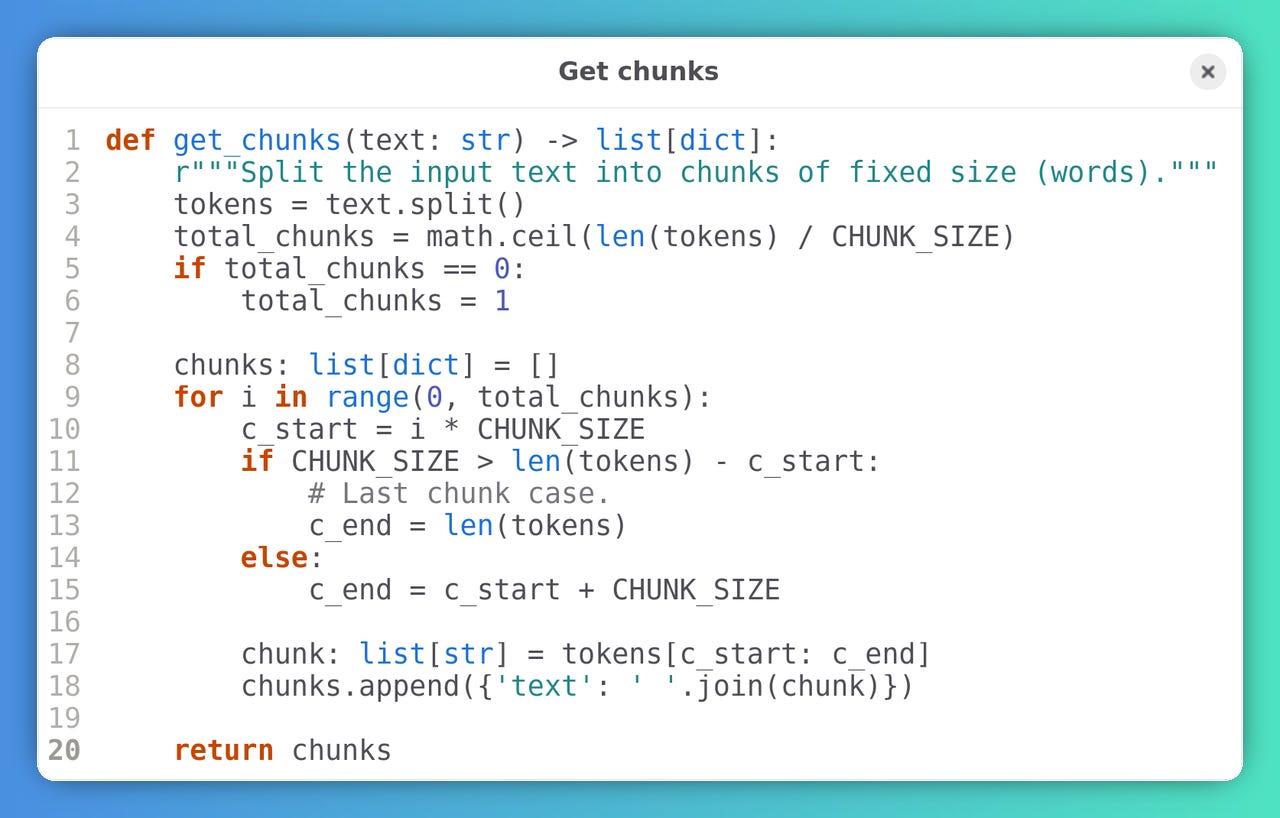
You’ll see that I was also able to try different summarization models and they work more or less the same. I defined these models in a list of objects. The parameters are self-explanatory. Note that the script can generate a bunch of different summaries based on the num_return_sequences value11.

We use the same functions as the previous tests just with more parameters, such as do_sample, num_return_sequences, temperature, and top_k. It’s then just a matter of working by chunks12.

📊 Results
Generating all these summaries takes a few minutes on CPU. Following are a couple of outputs so you can compare them to the input. Let’s start with the facebook/bart-large-cnn model13:

facebook/bart-large-cnn summary outputThis is an output from google/pegasus-billsum14:

google/pegasus-billsum summary outputI know what you are thinking: the quality of the output is bad. While this is true, you could manually select some sentences from these outputs to generate a sensible summary. Remember that these models are tiny compared to the commercial GPTs.
🎉 Conclusion
As you see, although Transformers are marketed as easy to use, some custom work is needed to make them running as wanted. Also, the four models I tested need about 12GB of disk space combined, so keep that in mind.
You can find the full source code in its repository.
I probably missed something along the way: let me know.
Footnotes
Code
In these first examples
pipeis defined like this:from transformers import pipeline pipe = pipeline(task='summarization', model='facebook/bart-large-cnn')print(pipe(input_text, max_length=30)[0]['summary_text'])Your min_length=56 must be inferior than your max_length=30. .venv/lib/python3.11/site-packages/transformers/generation/utils.py:1642: UserWarning: Unfeasible length constraints: `min_length` (56) is larger than the maximum possible length (30). Generation will stop at the defined maximum length. You should decrease the minimum length and/or increase the maximum length. warnings.warn( Artificial intelligence is the capability of computational systems to perform tasks typically associated with human intelligence. It is a field of research in computer scienceprint(pipe(input_text, min_length=20, max_length=50)[0]['summary_text'])Artificial intelligence (AI) is the capability of computational systems to perform tasks typically associated with human intelligence. It is a field of research in computer science that develops and studies methods and software.print(pipe(pathlib.Path('captions_clean.txt').read_text())[0]['summary_text'])Traceback (most recent call last): File "<frozen runpy>", line 198, in _run_module_as_main File "<frozen runpy>", line 88, in _run_code File "poc_simple.py", line 44, in <module> print(pipe(pathlib.Path('captions_clean.txt').read_text())[0]['summary_text']) ^^^^^^^^^^^^^^^^^^^^^^^^^^^^^^^^^^^^^^^^^^^^^^^^^^^^ File ".venv/lib/python3.11/site-packages/transformers/pipelines/text2text_generation.py", line 299, in __call__ return super().__call__(*args, **kwargs) ^^^^^^^^^^^^^^^^^^^^^^^^^^^^^^^^^ File ".venv/lib/python3.11/site-packages/transformers/pipelines/text2text_generation.py", line 187, in __call__ result = super().__call__(*args, **kwargs) ^^^^^^^^^^^^^^^^^^^^^^^^^^^^^^^^^ File ".venv/lib/python3.11/site-packages/transformers/pipelines/base.py", line 1464, in __call__ return self.run_single(inputs, preprocess_params, forward_params, postprocess_params) ^^^^^^^^^^^^^^^^^^^^^^^^^^^^^^^^^^^^^^^^^^^^^^^^^^^^^^^^^^^^^^^^^^^^^^^^^^^^^^ File ".venv/lib/python3.11/site-packages/transformers/pipelines/base.py", line 1471, in run_single model_outputs = self.forward(model_inputs, **forward_params) ^^^^^^^^^^^^^^^^^^^^^^^^^^^^^^^^^^^^^^^^^^^^ File ".venv/lib/python3.11/site-packages/transformers/pipelines/base.py", line 1371, in forward model_outputs = self._forward(model_inputs, **forward_params) ^^^^^^^^^^^^^^^^^^^^^^^^^^^^^^^^^^^^^^^^^^^^^ File ".venv/lib/python3.11/site-packages/transformers/pipelines/text2text_generation.py", line 216, in _forward output_ids = self.model.generate(**model_inputs, **generate_kwargs) ^^^^^^^^^^^^^^^^^^^^^^^^^^^^^^^^^^^^^^^^^^^^^^^^^^^^^^ File ".venv/lib/python3.11/site-packages/torch/utils/_contextlib.py", line 116, in decorate_context return func(*args, **kwargs) ^^^^^^^^^^^^^^^^^^^^^ File ".venv/lib/python3.11/site-packages/transformers/generation/utils.py", line 2430, in generate model_kwargs = self._prepare_encoder_decoder_kwargs_for_generation( ^^^^^^^^^^^^^^^^^^^^^^^^^^^^^^^^^^^^^^^^^^^^^^^^^^^^ File ".venv/lib/python3.11/site-packages/transformers/generation/utils.py", line 867, in _prepare_encoder_decoder_kwargs_for_generation model_kwargs["encoder_outputs"]: ModelOutput = encoder(**encoder_kwargs) # type: ignore ^^^^^^^^^^^^^^^^^^^^^^^^^ File ".venv/lib/python3.11/site-packages/torch/nn/modules/module.py", line 1751, in _wrapped_call_impl return self._call_impl(*args, **kwargs) ^^^^^^^^^^^^^^^^^^^^^^^^^^^^^^^^ File ".venv/lib/python3.11/site-packages/torch/nn/modules/module.py", line 1762, in _call_impl return forward_call(*args, **kwargs) ^^^^^^^^^^^^^^^^^^^^^^^^^^^^^ File ".venv/lib/python3.11/site-packages/transformers/models/bart/modeling_bart.py", line 843, in forward embed_pos = self.embed_positions(input) ^^^^^^^^^^^^^^^^^^^^^^^^^^^ File ".venv/lib/python3.11/site-packages/torch/nn/modules/module.py", line 1751, in _wrapped_call_impl return self._call_impl(*args, **kwargs) ^^^^^^^^^^^^^^^^^^^^^^^^^^^^^^^^ File ".venv/lib/python3.11/site-packages/torch/nn/modules/module.py", line 1762, in _call_impl return forward_call(*args, **kwargs) ^^^^^^^^^^^^^^^^^^^^^^^^^^^^^ File ".venv/lib/python3.11/site-packages/transformers/models/bart/modeling_bart.py", line 102, in forward return super().forward(position_ids + self.offset) ^^^^^^^^^^^^^^^^^^^^^^^^^^^^^^^^^^^^^^^^^^^ File ".venv/lib/python3.11/site-packages/torch/nn/modules/sparse.py", line 190, in forward return F.embedding( ^^^^^^^^^^^^ File ".venv/lib/python3.11/site-packages/torch/nn/functional.py", line 2551, in embedding return torch.embedding(weight, input, padding_idx, scale_grad_by_freq, sparse) ^^^^^^^^^^^^^^^^^^^^^^^^^^^^^^^^^^^^^^^^^^^^^^^^^^^^^^^^^^^^^^^^^^^^^^^ IndexError: index out of range in selfdef clean_text(text: str) -> str: # Remove some useless symbols for summary generation (backticks), keep only ASCII 32 as whitespace. cleaned_text: str = text cleaned_text = re.sub(r'`', '', text) cleaned_text = re.sub(r'\s+', ' ', cleaned_text).strip() return cleaned_textPIPELINE_MIN_LENGTH_TOKENS: int = 128 PIPELINE_MAX_LENGTH_TOKENS: int = 256 PIPELINE_MIN_LENGTH_TOKENS_PERCENT_FACTOR: float = 0.2 PIPELINE_MAX_LENGTH_TOKENS_PERCENT_FACTOR: float = 0.4 def get_min_max_dst_length(text: str, model: str) -> tuple[int, int]: r"""Return the min and max length for the inferred string.""" try: tokenizer = BartTokenizer.from_pretrained(model) # Get PyTorch tensors. Avoid overflow by setting max token input limit (1024). inputs = tokenizer(text, return_tensors="pt", truncation=True, max_length=MAX_LENGTH) # Get the y (column, index 1) size of the tensor corresponding to the tokens. num_tokens: int = inputs['input_ids'].shape[1] # Set min_length and max_length based on the number of tokens. # Minimum length as PIPELINE_MIN_LENGTH_TOKENS_PERCENT_FACTOR of input # tokens or PIPELINE_MIN_LENGTH total, depending on which is lower. min_length: int = min( PIPELINE_MIN_LENGTH_TOKENS, int(num_tokens * PIPELINE_MIN_LENGTH_TOKENS_PERCENT_FACTOR) ) # Maximum length as PIPELINE_MAX_LENGTH_TOKENS_PERCENT_FACTOR of input # tokens or total, depending on which is lower. max_length: int = max( PIPELINE_MAX_LENGTH_TOKENS, int(num_tokens * PIPELINE_MAX_LENGTH_TOKENS_PERCENT_FACTOR) ) if PIPELINE_MAX_LENGTH_TOKENS > num_tokens: max_length: int = num_tokens * PIPELINE_MAX_LENGTH_TOKENS_PERCENT_FACTOR except TypeError: min_length = PIPELINE_MIN_LENGTH_TOKENS max_length = PIPELINE_MAX_LENGTH_TOKENS min_length = int(min_length) max_length = int(max_length) logging.debug(f'min_length: {min_length}, max_length: {max_length}') return min_length, max_lengthdef get_chunks(text: str) -> list[dict]: r"""Split the input text into chunks of fixed size (words).""" tokens = text.split() total_chunks = math.ceil(len(tokens) / CHUNK_SIZE) if total_chunks == 0: total_chunks = 1 chunks: list[dict] = [] for i in range(0, total_chunks): c_start = i * CHUNK_SIZE if CHUNK_SIZE > len(tokens) - c_start: # Last chunk case. c_end = len(tokens) else: c_end = c_start + CHUNK_SIZE chunk: list[str] = tokens[c_start: c_end] chunks.append({'text': ' '.join(chunk)}) return chunksSUMMARIZATION_MODELS: list[dict] = [ { 'task': 'summarization', 'model_name': 'google/pegasus-billsum', # do_sample set False makes the summary deterministic. 'do_sample': True, 'enabled': True, # Number of summaries per model. 'num_return_sequences': 3, }, { 'task': 'summarization', 'model_name': 'facebook/bart-large-cnn', 'do_sample': True, 'enabled': True, # Some models generate deterministic outputs so we don't need to # generate summaries multiple times. 'num_return_sequences': 1, 'temperature': 0.9, 'top_k': 50, }, { 'task': 'summarization', 'model_name': 'philschmid/bart-large-cnn-samsum', 'do_sample': True, 'enabled': True, 'num_return_sequences': 3, }, { 'task': 'summarization', 'model_name': 'facebook/bart-large-xsum', 'do_sample': True, 'enabled': True, 'num_return_sequences': 3, }, ]def summarize(text: str) -> list[dict[str, str]]: summary: list[dict[str, str]] = [] chunks: list[str] = get_chunks(text) mdls: list[dict] = [m for m in SUMMARIZATION_MODELS if m['enabled']] for i, m in enumerate(mdls): summary.append({'model': m['model_name']}) update_chunk_lengths(chunks, m['model_name']) pipe = pipeline(m['task'], model=m['model_name']) task_result_key: str = 'summary_text' if m['task'] == 'summarization' else 'generated_text' temperature, top_k = ( m.get('temperature', DEFAULT_TEMPERATURE), m.get('top_k', DEFAULT_TOP_K), ) chk: list[list[str]] = [] for j, c in enumerate(chunks): logging.info(f'model: {m["model_name"]} ({i + 1} of {len(mdls)}), chunk {j + 1} of {len(chunks)}') data = pipe( c['text'], min_length=c['min_length'], max_length=c['max_length'], do_sample=m['do_sample'], num_return_sequences=m['num_return_sequences'], temperature=temperature, top_k=top_k, ) chk.append(data) # Merge the summary by chunks. r: list[str] = [] for k in range(0, m['num_return_sequences']): t: list[dict] = [] for l in range(0, len(chunks)): t.append(chk[l][k]['summary_text']) r.append(' '.join(t)) logging.debug(f'number of summaries for model {m["model_name"]}: {len(r)}') logging.debug(r) summary[-1]['text'] = [clean_text(txt) for txt in r] write_file_output(summary[-1]) return summaryDuckAI has started to put some limits on the number of daily interactions and they are limits by IP address. So this prompted me to research other local AI models to run with Ollama. But I mean like serious models not like toy models. So I tried several of these and of course if you start with the 1.5 billion models, they, the ones I tried replied me in Chinese. So they were pretty useless. And in the end, the one which works better up until now is the 14 billion model. And this one was the one that was performing better quality wise, and also speed wise, giving the size of the model. Ollama is a tool that allows you to create and edit Python, FastAPI and Svelte models. Ollama can be used to create, let's say fine tuned models, but they're not fine tuned. Once you have your, your custom model file, then you need to load it in, uh, in Ollamas and it will result as a separate model. The Docker compose file is pretty straightforward. It's a dialogue (whiptail) based system. So I can upgrade all the models in one go. I can download the new models from the Olama website or from HuggingFace, if you put the full URL. The docker-compose script is used to download, update and delete models in Ollama instances. The commands are all done with the shell commands. If you want to create a custom model, you need to put the file in the model files directory. This is the multi-line version of tgpt, which I think is better than ShellGPT. It has several modes just like Shell GPT, but it seems to work better. It's very fast once you, you run the command, it exits the script. It will pull from ollama.com the manifests of each model and see if they need to be updated, but, uh, they don't need to. Ollama is a free and open-source terminal chat app. The app allows users to chat with each other in a chat room. Ollama can also be used to create custom models and chat with other users. The latest version of the app is available on GitHub and can be downloaded from the company's site. It's available as a free download from the Google Play Store or from the App Store. For more information on the app or to download the latest version from the Play Store click here. For the full video, check out the video description and the QR codes at the bottom of the page.
Q 2.5 coder models with different model sizes and quantizations: (1) with different model sizes and quantizations, (2) with the least quantization, and (3) with the least base model. Makes this one the base model for all of the models in the latest series of specific Q models with significant improvements in code generation, code reasoning, and code fixing. (Sec. 3) Defines "Q 2.5 coder models" as computer programs with a specified set of coder models (those with different model sizes and quantizations, or with at least a base model and at least one with the least quantization) that can be used to create models. This model is specialized for coding assistance in Fast-svelte-Face and Svelte-Face systems. It's a base model for those systems, and it works like any other models in them, but it adds a specialized link and a code to allow users to load their custom model file in Ol model file reference, and it will result in a separate file for each model. (This model was named Fast-svelte-Face.) Modifies the model file hierarchy to allow users to add custom models in one volume and all other models in another volume. Allows the upgrade of models from the model file directory to the custom file directory, and allows users to add models from the website directory. Modifies the model dialog to include a prompt to select a model if there is a name of a name of the model. Sets up a process to create a custom model if there is more than one file in the model directory and then do like this. Modifies the model dialog to include a prompt to select a model if there is a name of a name of the model. Sets forth a process to add text to the model file and some more text modes, so if there is more than one file, it will appear in, in a list, and then you put a name of a name of the model for the model. Modifies the default model of the Control-D terminal to include a custom model of the same name as the one in the video description and a code to add authentication to the internet if you want to expose Olpose to the internet.<n> Modifies the model name of the terminal to include the name of a custom model sent to the terminal by the person who created the model.<n><n>Bars the command to run this terminal chat when the first one does not have a multi-default line.<n><n>Allows the user to add an authentication code to the internet if it's a non-default URL and such authentication code must be put on the model name.